Extensions are add-ons for your web browser that provide you with a greater ability to accomplish tasks on the internet. Typical uses of browser extensions include blocking ads, managing passwords, and improving productivity.
Browser extensions run directly in the browser. Scripts that run in the background of the extension allow them to interact with web pages. Depending on the permissions given, the extension may be able to read, change, and send data from one website to another.
While this improves your experience, it can create security issues as well.
The modern web browser functions much like a complicated operating system and manages the browser’s memory and executes sophisticated applications, not to mention handles many of the most critical pieces of information about an organisation. Despite the focused efforts of IT departments to lock down all endpoint devices and enforce distinctive identity-management policies, they frequently neglect to protect the actual third-party applications that also run within the browser itself.
Browser extensions create a huge attack surface that is mostly unobserved. These small code blocks receive huge amounts of privileges to read, modify, and send data for the users these extensions support. As the operating system’s methods for defending against cyber-attacks have improved, cyber criminals have redirected their attack efforts to the web browser.
This article details the reasons for browser extensions being one of the largest blind spots for cybersecurity in 2026 and illustrates how web browser attacks can be performed. It will also discuss recent attacks that have taken place and will offer organizations with usable frameworks on how they can defend themselves against this growing area of concern.
Want an Extension Risk Assessment?
We can inventory extensions, validate permissions, and recommend enforceable browser controls.
The Increasing Growth of Vulnerabilities with Browser Extensions
Security teams often assume browsers are “secure environments.” However, the third-party extension ecosystem introduces untrusted code into the workspace where users authenticate, access cloud consoles, and handle sensitive data.
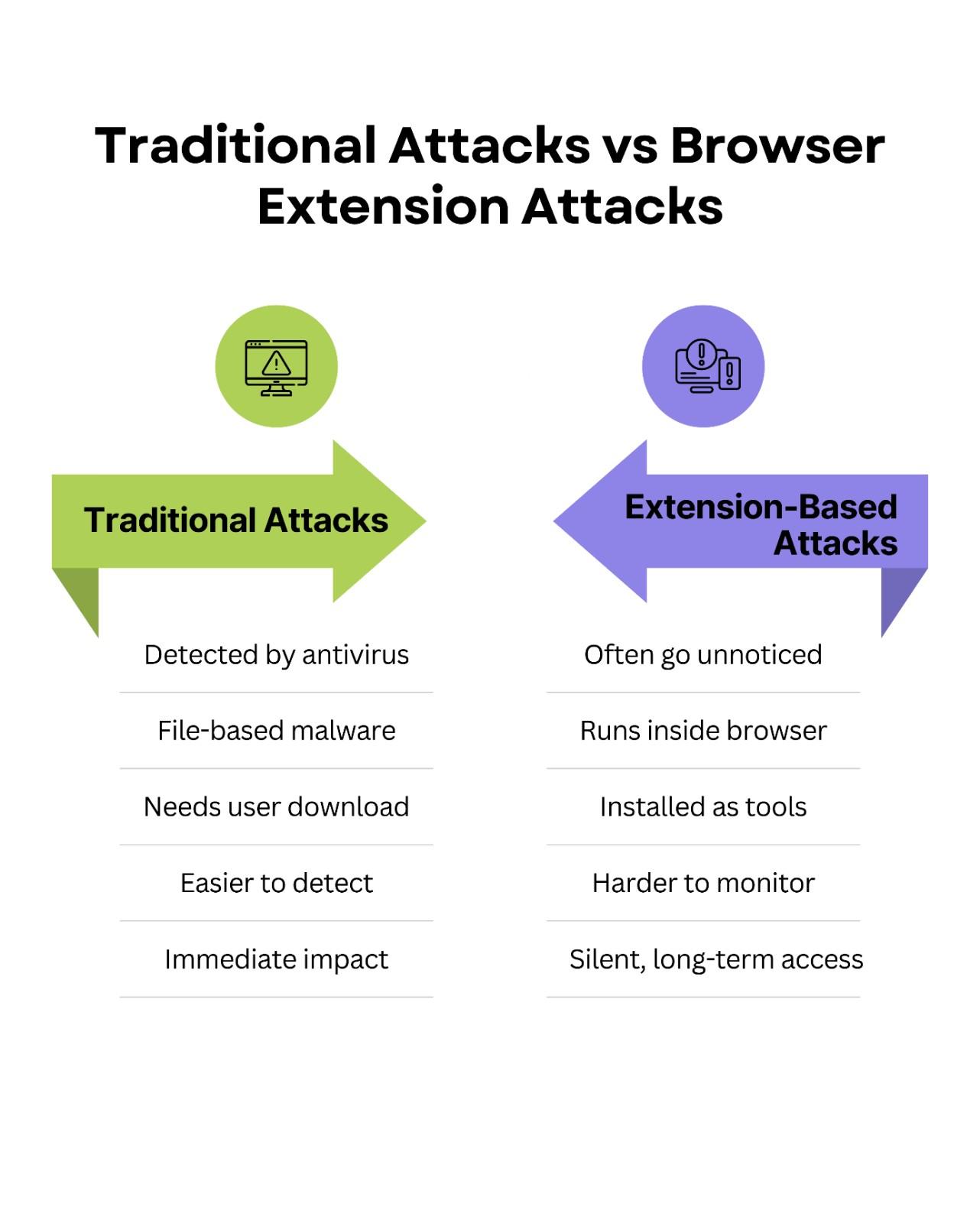
Over the last two years, browser-based attacks have increased sharply. As endpoint defenses improved, attackers needed an alternative path. Extensions are attractive because they operate inside the browser sandbox using native web technologies like JavaScript, HTML, and CSS—often bypassing traditional file-scanning patterns.
Furthermore, the barrier to entry for extension developers remains incredibly low. Attackers easily purchase legitimate, abandoned extensions with established user bases. Once acquired, they push silent updates containing malicious payloads to millions of users simultaneously. This supply chain attack model requires minimal effort and yields catastrophic results.
How Attackers Exploit Extensions
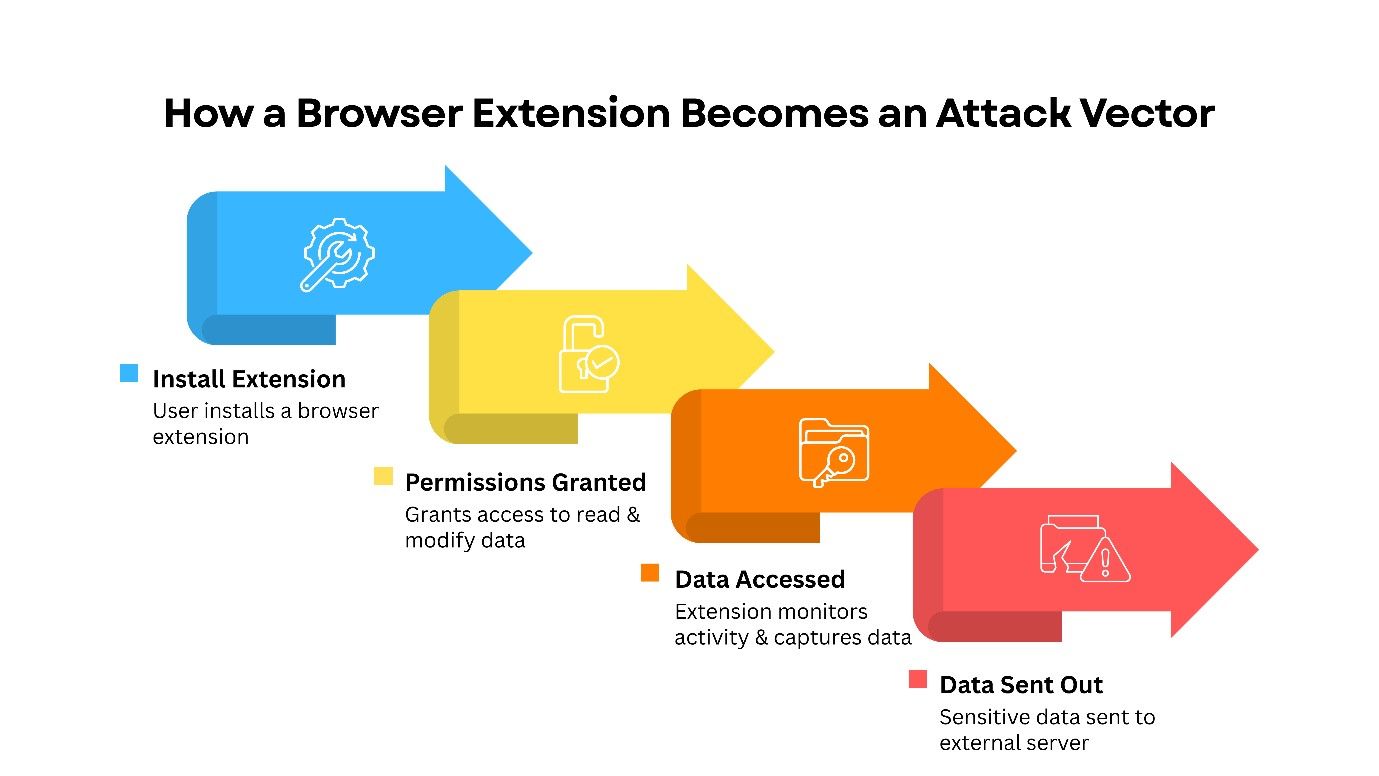
Understanding the threat requires looking at how extensions function on a technical level. Upon installation, extensions depend on certain permissions to be given to it. Users are mostly unaware and unwittingly accept the prompts they see from extensions, giving this third-party add-on broad permissions over their browsing activity. Extensions can ask the user to allow them to "read and change any data you may have accessed on the websites you have visited." This is how an extension's content scripts get to directly manipulate the DOM of whatever page is currently being displayed. Attackers can use this access to inject their own malicious scripts, scrape sensitive data shown in browser windows, and/or change details about online transactions. For example, if an extension has been compromised in this manner, it can replace the destination wallet address during a cryptocurrency transaction transparently to the user.
Attackers can pursue authentication credential capture by stealing cookies. Cookies are used as a part of the authentication process on numerous websites. Malicious extensions can extract an authenticated user's session cookies (given sufficient permission) from the user's browser and send them to a separate “command-and-control” server. By stealing these active session tokens, attackers can circumvent the two-factor authentication (2FA) of the original user. Attackers can then load the stolen session cookie into their own web browser and inherit the logged-in state of the original user.
The Keylogging Threat
Extensions with the ability to record the input of users on all loaded web pages are very good keyloggers. An attacker can use a normal, non-threatening grammar checking extension which will log all keystrokes made by the user when using web-based email clients, CRM or online banking. This information will then be securely exfiltrated using HTTPS as an overlay on normal web traffic.
Real-World Case Studies
Extensions with the ability to record the input of users on all loaded web pages are very good keyloggers. An attacker can use a normal, non-threatening grammar checking extension which will log all keystrokes made by the user when using web-based email clients, CRM or online banking. This information will then be securely exfiltrated using HTTPS as an overlay on normal web traffic.
Developer Tool Supply Chain Attack
In January 2025, a JSON formatting developer extension was purchased by an anonymous third-party and has a large following in the software development community. A few weeks later, the new owner of the extension released a minor updated version of the extension that included an obfuscation script to determine when someone used popular cloud infrastructure consoles.
The third-party's script captured AWS session tokens and session Keys; these credential were then sent to the third-party's server. Because the developers who used the developer extension had high levels of privilege, once the credential were sent to the third-party's server the third-party malicious actor had immediate access to backend infrastructure for several well-known tech companies. The breach went undetected for a month; malicious activity was originating from an authenticated session.
The Fake Productivity Suite
Another major example of using these kinds of tools is the highly orchestrated email phishing campaign directed toward financial analysts. The email directed recipients to a website to obtain a free Artificial Intelligence spreadsheet assistant developer extension for excel. The website used a highly credible software developer as a form of verification.
Once installed, the extension requested permissions to read data across all tabs. It specifically monitored traffic to specific proprietary financial databases. The extension systematically scraped client financial data and intellectual property, leading to a massive data leak that cost the affected firm millions in regulatory fines.
Reduce Browser-Based Identity Risk
Most extension attacks become business incidents because sessions and access tokens are high-value targets.
Best Practices for Users and Organizations
Relying on user intuition to identify dangerous extensions is a failing strategy. Organizations must adopt proactive, system-level controls to mitigate these risks effectively.
Implement Strict Extension Allowlisting
The most effective defense against malicious add-ons is a default-deny policy. Organizations should implement strict allowlisting through their mobile device management (MDM) or group policy tools. Employees should only be able to install extensions that security teams have thoroughly vetted and approved.
Enforce Enterprise Browser Management
Standard consumer browsers lack the granular security controls required for modern enterprises. Migrating to enterprise-managed browsers allows IT teams to enforce strict policies across the organization. You can restrict extensions from running on highly sensitive domains, such as internal single sign-on (SSO) portals or HR systems, regardless of the extension's installation status.
Conduct Regular Audits
Security teams must continuously audit the extensions installed across their fleet. An extension that was safe a year ago might have changed ownership and introduced malicious code yesterday. Utilize automated tools to track extension installations, monitor for uncharacteristic permission changes, and identify deprecated or abandoned add-ons.
Implementing Zero-Trust Network Access (ZTNA) requires moving away from perimeter-based security because when a browser becomes compromised, perimeter-based security increases the blast radius. ZTNA allows for continuous authentication and authorization of every request, regardless of whether the user has an active session token. By limiting lateral movement, you reduce the blast radius of any extension that successfully steals credentials.
Browser extensions are one of the most significant risk factors to the overall security posture of the modern enterprise. As we move forward through the complicated threat environment of 2026, it has become abundantly clear that if we continue to use perimeter-based defenses and do not recognize the software running directly in the browser, then we are asking for trouble. The attackers know how to use the power of DOM manipulation, as well as how to hijack sessions for the purposes of illegally accessing sensitive data and ultimately bringing down your business.
To adequately protect your company, you must start treating your web browser as an extremely protected area of your business, therefore, moving from reactive monitoring to proactive control of the browser and restricting the use of browsers to only those extensions that have been specifically allowed using strict allowlisting, enterprise browser policies and continuous auditing of the browsers’ content. Securing your browser environment is no longer a "nice-to-have" security enhancement; it is now an absolute requirement to protect your company's digital infrastructure. The first thing you should do is audit the extensions that are used by your browsers on your network and create a framework that prevents untrusted code from accessing your most sensitive data.
Frequently Asked Questions
1) Why are browser extensions a major risk in 2026?
Because extensions operate inside the browser where users authenticate and access sensitive systems. With broad permissions, a compromised extension can steal sessions, read data, or manipulate transactions without needing traditional malware execution.
2) Can extensions bypass MFA?
In many cases, yes—by stealing authenticated session cookies or tokens. If an attacker reuses a valid session token, MFA may not be re-prompted, depending on how the application manages sessions.
3) What is the strongest control against malicious extensions?
A default-deny allowlist enforced centrally (MDM / group policy / enterprise browser management). This prevents end users from installing unvetted extensions and reduces exposure to extension supply-chain takeovers.
4) How often should organizations audit extensions?
Continuously where possible (automated inventory + alerts for permission/ownership changes), and at minimum on a scheduled cadence (monthly/quarterly) depending on organizational risk. Ownership changes and silent updates can introduce risk overnight.
Secure the Browser Workspace
Audit extension usage, enforce allowlists, restrict risky permissions, and reduce identity blast radius with enterprise browser governance and Zero Trust controls.
Talk to CyberCube